
Mettler Toledo Precision Scales#
Summary |
Image |
|---|---|
|
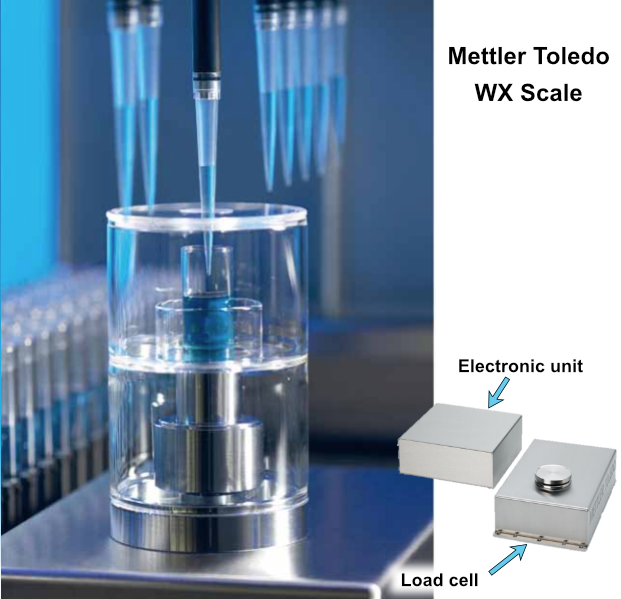 Figure: Mettler Toledo WXS205SDU used for gravimetric liquid transfer verification |
Setup (Physical)#
The WXS205SDU scale system consists of 2 required units and 1 optional unit:
Machine Components#
1. Load Cell |
2. Electronic Unit |
3. Terminal/Display |
|
|---|---|---|---|
Image |
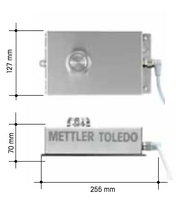 |
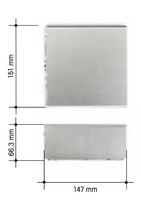 |
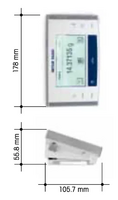 |
Description |
The weighing platform where samples are placed |
The control and communication module |
Optional: For manual reading of measurements |
Mettler Toledo Terminology#
Configuration Name |
Has Load Cell |
Has Electronics Unit |
Has Terminal/Display |
|---|---|---|---|
Balance |
✓ |
✓ |
✓ |
Weigh Module (or “Bridge”) |
✓ |
✓ |
✗ |
Note: When used with PyLabRobot, the terminal/display is optional since all control is done programmatically.
Connection#
The scale communicates via an RS-232 serial port.
To connect it to your computer, you’ll likely need a USB-to-serial adapter. Any generic adapter using an FTDI chipset (typically ~$10) should work fine.
Setup (Programmatic)#
Import the necessary classes:
from pylabrobot.scales import Scale
from pylabrobot.scales.mettler_toledo_backend import MettlerToledoWXS205SDUBackend
Initialize the scale backend and create a scale instance. You’ll need to specify the serial port where your scale is connected:
backend = MettlerToledoWXS205SDUBackend(port="/dev/cu.usbserial-110")
scale = Scale(name="scale", backend=backend, size_x=0, size_y=0, size_z=0)

await scale.setup()
0.00148
Warning
Warm-up Time Required
This scale requires a warm-up period after being powered on. Mettler Toledo documentation specifies 60-90 minutes, though in practice 30 minutes is often sufficient.
If you attempt measurements before the scale has warmed up, you’ll likely encounter an error: “Command understood but currently not executable (balance is currently executing another command)”.
Tip: Sometimes power-cycling the scale (unplugging and replugging the power cord) can help resolve initialization issues.
Note
This scale is the same model used in the Hamilton Liquid Verification Kit (LVK).
Usage#
The scale implements the three core methods required for all PyLabRobot scales.
They are presented here in typical workflow order:
.zero()#
Calibrates the scale to read zero when the platform is empty. Unlike taring, this establishes the baseline “empty” reading without accounting for any container weight. Use this at the start of a workflow or after removing all items from the platform.
await scale.zero(timeout=5)
Note
See the Scales documentation for details on the timeout parameter and when to use different timeout modes.
.tare()#
Resets the scale reading to zero while accounting for the weight of a container already on the platform. Use this when you want to measure only the weight of material being added to a container.
Example workflow: Place an empty beaker on the scale → tare → dispense liquid → read only the liquid’s weight.
await scale.tare(timeout=5)
The difference between load at scale.zero() and load at scale.tare() is stored in and can be retrieved from the scales’s memory:
await scale.request_tare_weight()
read_weight()#
Retrieves the current weight measurement from the scale in grams.
await scale.read_weight(timeout=0)
0.00148
Typical Workflow#
Here’s a common pattern for gravimetric liquid transfer (i.e. aspiration AND dispensation) verification:
import asyncio

# 1. Zero the scale
await scale.zero(timeout="stable")

# 2. Place container with liquid on scale

# 3. Aspirate liquid from container (on scale)
# (your liquid handling code here)

# 4. Tare the scale (ignore weight loss from aspiration)
await scale.tare(timeout=5)

# 5. Dispense liquid back into same container (on scale)
# (your liquid handling code here)

# 6. Brief pause to allow scale to settle
await asyncio.sleep(1)  # Allow 1 second for settling after dispense

# 7. Read the weight of dispensed liquid
weight_g = await scale.read_weight(timeout=5)

# 8. Convert weight to volume
weight_mg = weight_g * 1000
liquid_density = 1.06  # mg/µL for 50% v/v glycerol at ~25°C, 1 atm
volume_uL = weight_mg / liquid_density

print(f"Dispensed {weight_mg:.2f} mg or ({volume_uL:.2f} µL)")
Performance Characterization#
Example: Measuring Read Time#
You can easily benchmark the scale’s performance using standard Python timing:
import time
import numpy as np

times = []
for i in range(10):
  t0 = time.monotonic_ns()
  await scale.read_weight(timeout="stable")
  t1 = time.monotonic_ns()
  times.append((t1 - t0) / 1e6)

print(f"{np.mean(times):.2f} ms ± {np.std(times):.2f} ms")
100.44 ms ± 6.78 ms